MeshCore · LoRa · off-grid
When the grid goes dark, your messages don't.
MCTerm turns a LoRa handheld into a complete off-grid messenger. Chats, direct messages, a map and every setting run on the radio itself — no phone, no internet, no cell towers, no accounts. Just radio.
MCTerm v0.9.14 · MeshCore v1.17.1
Radio    869.618 MHz BW62.5 SF8 CR8   OK
Sensors  BME280 @0x76                 OK
Storage  SD card                      OK
Contacts 42 loaded
WiFi     AP 192.168.4.1 · WebUI on
Ready. Listening on the mesh_
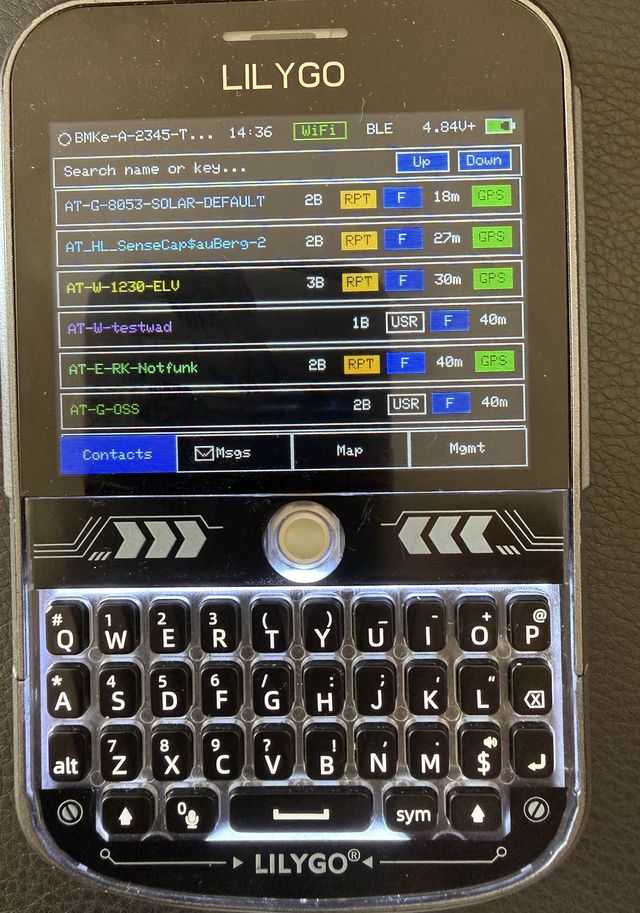
Everything below is built in — no add-ons, no cloud. Four things people don't expect from a LoRa radio:
http://IP-of-device or http://device-name.local (mDNS). Messages, contacts, map and every setting — on phone, tablet or laptop.
MAPAutomatic map downloaderOn WiFi, missing tiles are fetched while you pan and cached to SD or flash. Offline next time.
LOCKLock screenAutolock with timer and your own picture. The mesh keeps receiving while locked.
ALARMPager alarmA trigger word in a DM or channel sounds a siren, pops up and blinks until you touch the screen.
The WebUI — your radio in any browser
Connect to the device's WiFi (or let it join your router), type its IP address or device-name.local, log in with the 6-digit BLE PIN — done. These are real screenshots of the WebUI on a phone:
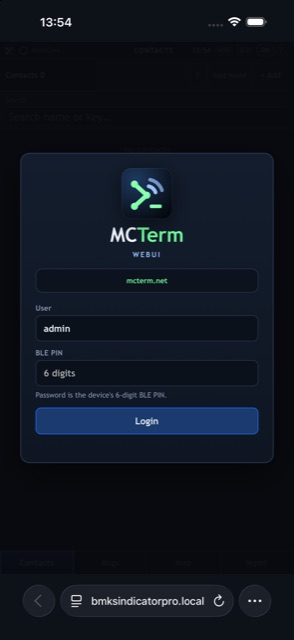
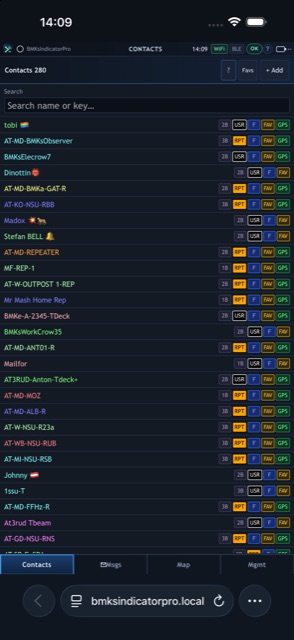
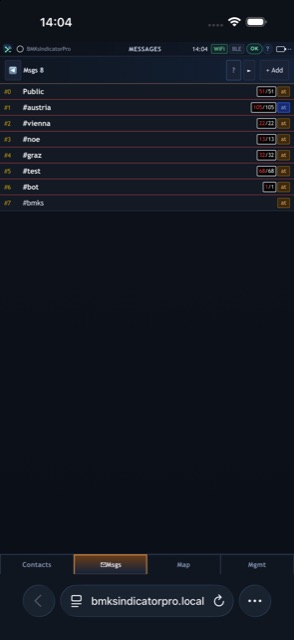
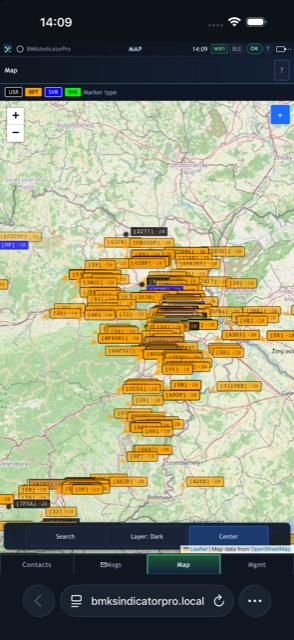
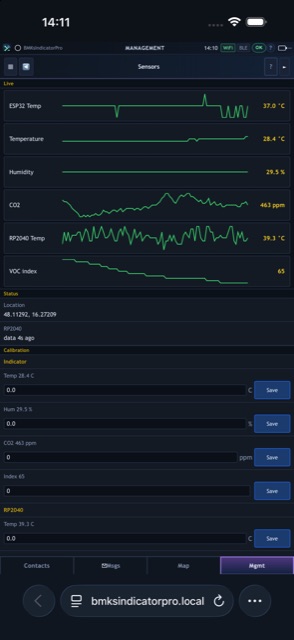
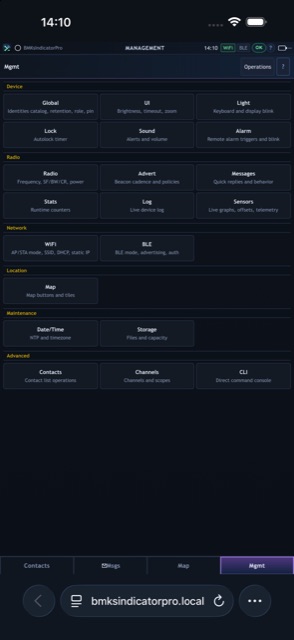
Same settings and same features as on the device — change one, the other follows live.
Runs on real hardware
One firmware family, five more screens besides the T-Deck Plus — same tabs, same badges, same features. Every photo below is a real device running MCTerm:
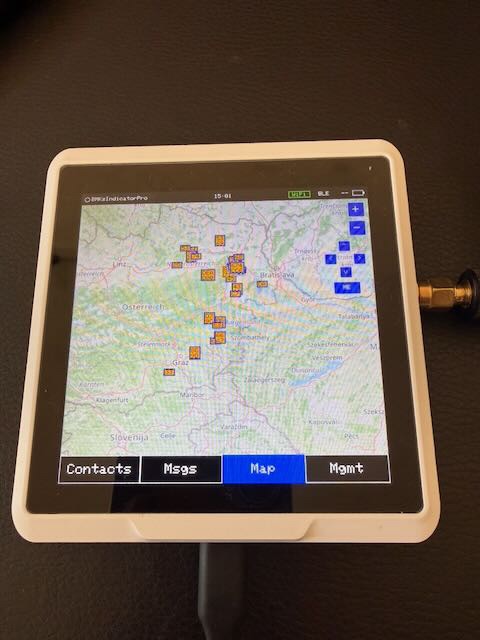
480×480 touch · ESP32-S3 + RP2040
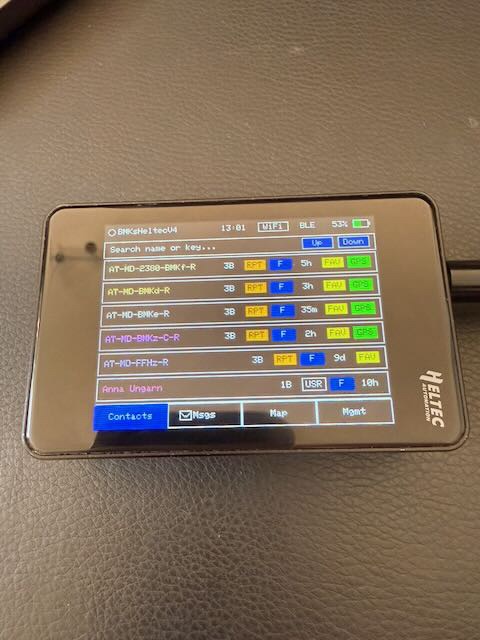
touch TFT · GPS with expansion kit
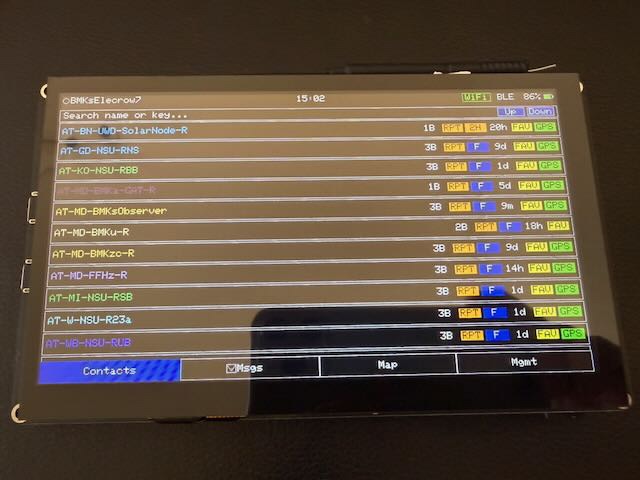
1024×600 touch
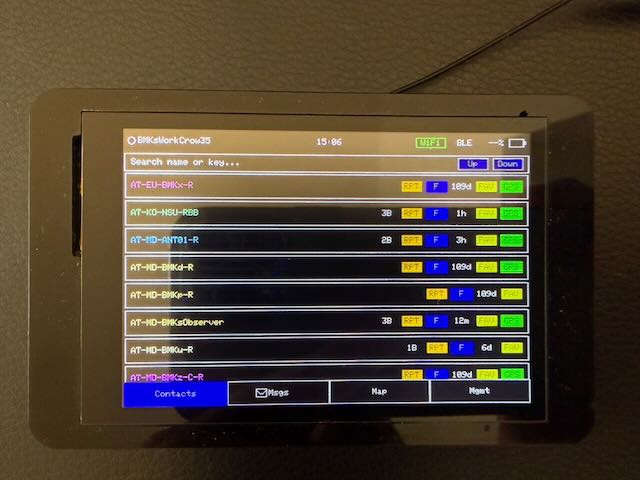
480×320 touch
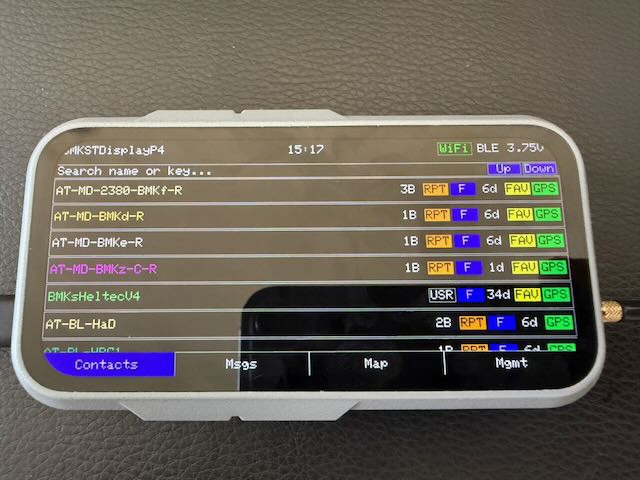
large touch display · preview
Your phone needs a cell tower. A cell tower needs power and a backbone. When one of them fails, the chat apps go quiet. A MeshCore radio talks straight to the next radio — and MCTerm puts the whole messenger on it.
- Blackout & power cuts Cells go down within hours of a blackout. The mesh doesn't use them at all. OFFGRID
- Mountains & dead zones Hiking, skiing, camping, sailing — keep your group in touch without coverage. GPS
- Emergency teams A network in minutes, no infrastructure. The pager alarm wakes people up. ALARM
- Your neighbourhood Join the local MeshCore network. Repeaters on roofs and hills carry your messages further. RPT
- Events & groups Festivals, clubs, field days: channels for everyone, DMs for the few. #
- Privacy No account, no phone number, no server. Direct messages are end-to-end encrypted. E2E
How the mesh works
Every message hops from radio to radio. Repeaters — often solar-powered, on rooftops and hills — pass it on. The first message floods the mesh to find a path; after that MeshCore sends it along that path directly, which keeps the channel free. MCTerm runs the unchanged MeshCore core (v1.17.1), so it talks to every MeshCore node, repeater, room server and app.
Why a screen on the radio?
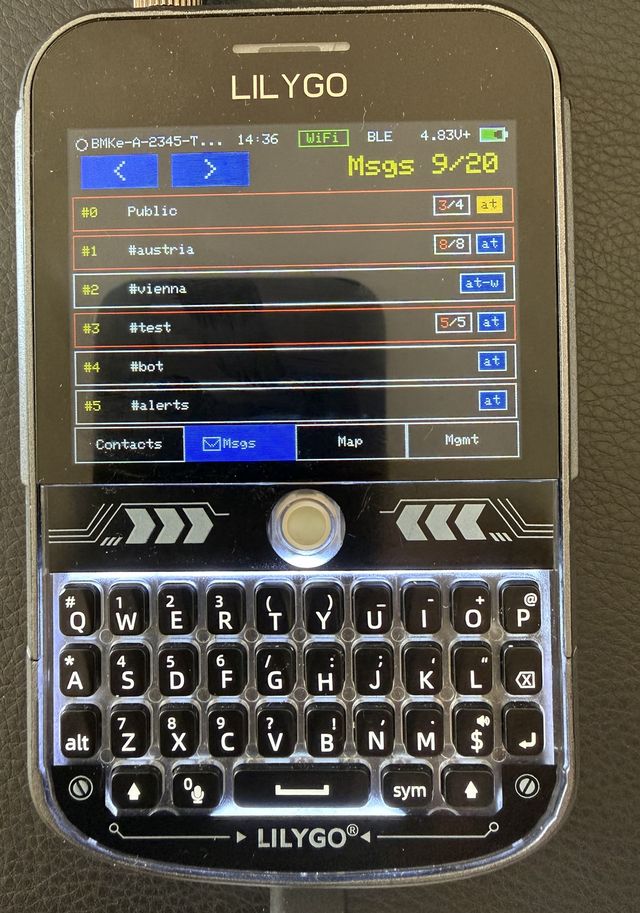
Messaging the way you know it from your phone — on the radio. Tap a row.
-
Public channel,
#hashtagchannels (just type#name) and private channels with a secret key. Share a channel as QR code. Region scopes keep flood traffic in your area. Tap a#hashtagin a message to join it — or paste someone's contact/channel share link into a chat and tap it to add them, no QR scanner needed. -
End-to-end encrypted with your contact's public key. A check mark appears when the delivery confirmation (ACK) comes back; if it doesn't, MCTerm retries and finds a new route — or tap Resend on the message yourself.
-
Log in to MeshCore room servers: shared group chats that store the history, so you catch up when you're back in range. Admins can manage rooms and repeaters over the air.
-
Every single emoji of Unicode 18.0 and 259 country flags are built into the firmware (Google Noto Emoji) and drawn on the screen — no
?boxes. The keyboard's EMO page has the 40 favourites; on the T-Deck press Alt+E. -
One tap sends your canned text (“OK”, “Heading back”). Two reply templates fill in hops, SNR and RSSI of the message you answer — perfect for range tests.
-
For every message: full text, hops and path, SNR/RSSI, repeats heard, delivery state. Tap Path to draw the route on the map, or Resend to send the same text again.
Pager alarm
ALARMTurn your radio into a pager. Choose a trigger phrase — for example FIRE or CALL ME. When a direct or channel message contains it, MCTerm sounds a siren until you touch the screen.
- Trigger by DM, by channel message, or both
- Only from the contacts you pick (checked by public key) or from chosen channels
- Four siren styles, duration of your choice
- Optional full-screen popup and screen blink; keyboard blink on the T-Deck Plus
- Set up on the device or in the WebUI
Plays the same siren sweep as the T-Deck Plus speaker. Tap anywhere to stop.
Sounds
SPKKnow what arrived without looking. Every sound can be switched on or off, with volume Low / Med / High and quiet hours for the night. These are the device's real tones:
- Boot
- New DM
- New channel
- Ack (delivered)
Contacts
RPTFGPSEveryone the radio hears shows up in Contacts: users, repeaters, room servers and sensors, with hop count, last heard and distance. Search by name or key, mark favourites, sort by distance. Log in to your own repeaters over the air: status, neighbours, telemetry and a remote command line.
- Offline firstMap tiles come from the SD card or internal flash in the standard
{z}/{x}/{y}.pnglayout. No signal needed. - Auto-download over WiFiWhen WiFi is up, missing tiles are downloaded as you pan and saved to the cache — next time they're there offline.
- Pick your mapOpenStreetMap, OSM Germany, OpenTopoMap, Humanitarian, CyclOSM — or your own tile URL. The WebUI map uses the same source.
- Everyone on the mapNodes that share their position appear with their short ID. Tap to select, double-tap for details. ME jumps to you.
- See the routeTap Path on any message and the map shows each hop it took.
- GPS & trackingFollow-me, altitude bar, GPS time sync, and tracking: send your new position automatically every few metres you move.
Standalone is great — but sometimes you want a big screen and a real keyboard. Switch the link live, right from the device: Mgmt → WiFi → Use WiFi or Mgmt → BLE → Use BLE. Try it here (or tap WiFi / BLE in the status bar):
BLE — your phone
PINPair the original MeshCore app (Android, iOS) or another MeshCore client with your 6-digit PIN. Contacts and messages are the same on the phone and on the radio — read wherever it's handy.
WiFi — any browser, any app
WebUIOpen the built-in WebUI: no app, no install, no cloud. Or connect MeshCore companion apps and tools over WiFi.
- Access Point: the radio makes its own hotspot — open
http://192.168.4.1. Works in the middle of nowhere, up to 3 devices. - Station: the radio joins your router; use it from your laptop at home.
- Profiles for home, field and office — switch in one tap.
The WebUI is the device, in your browser
Same four tabs, same settings, updated live over a WebSocket. What you change in the browser changes on the device, and the other way round. Every MCTerm feature ships on the device and in the WebUI.
- Login with your device PIN
- Big map with search and message paths
- Firmware upload, identity import/export, alarm, sensors, debug view
- Keyboard shortcuts for fast typing on a laptop
Works with
- MeshCore appAndroid · iOS · WebBLE
- meshcore-cli / meshcore.jsPython and JavaScript clientsALT
- Built-in WebUIAny browser, no installWiFi
Mgmt
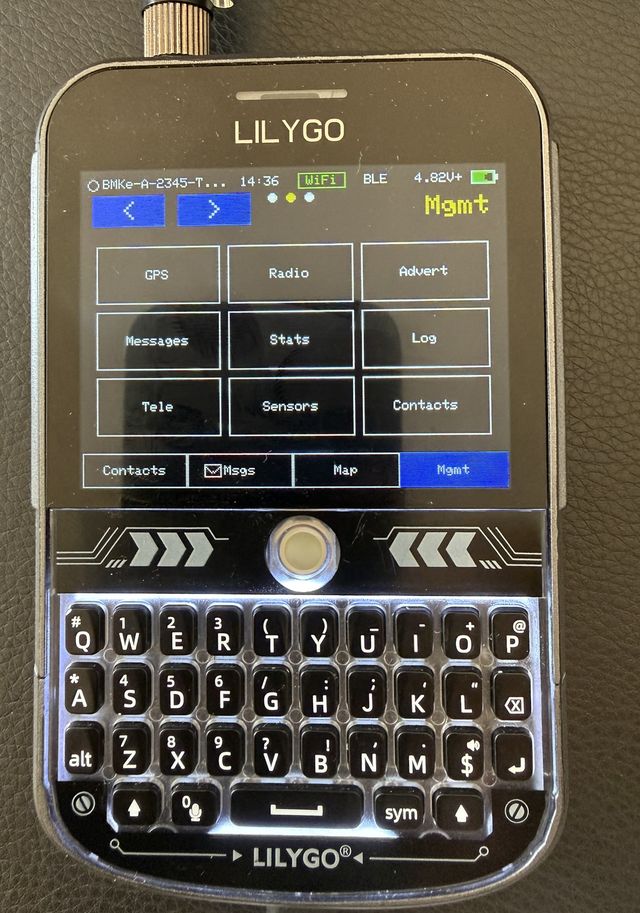
Everything is configurable on the device — 22 settings pages, the same grid you see on the screen. Tap a tile.
Global
Your name, up to 4 identities on internal storage or 8 on SD, primary disk (internal or SD), reboot and firmware update.
Sensors & telemetry
LIVEPlug an I2C sensor in and MCTerm finds it at boot. Readings show up as live graphs (last 96 samples), go out as telemetry to the mesh, and can be calibrated with an offset per value.
- Temperature21.4 °C
- Humidity48 %
- CO2612 ppm
- Battery4.12 V
Demo values. Supported: BME280, BME680, BMP280, AHT10/AHT20, INA219 / INA226 / INA260 / INA3221 power monitors, HC-SR04 distance, CrowTail light sensor, and the SenseCAP Indicator's built-in CO2, temperature, humidity and VOC sensors.
Devices
- LilyGO T-Deck Plus320×240 · keyboard + trackballGPSSPKSD
- Seeed SenseCAP Indicator480×480 touch · ESP32-S3 + RP2040CO2BUZSD
- Elecrow CrowPanel 3.5"480×320 touchSD
- Elecrow CrowPanel Advanced 7"1024×600 touch · ESP32-P4SD
- Heltec V4 TFT Extendedtouch TFT · GPS with expansion kitGPS
- LilyGO T-Display P4large touch displayPREVIEW
Install in 5 steps
- 1Download the firmware file for your device. Releases
- 2Open the MeshCore web flasher in Chrome or Edge: flasher.meshcore.io → Custom Firmware.
- 3First install: choose a full flash erase. Later updates keep your settings.
- 4SenseCAP Indicator: also flash the matching RP2040
.uf2from the same release. - 5Antenna on, power on. The first boot takes 1–2 minutes. Set your name and your region's radio settings in Mgmt → Radio (EU/UK default: 869.618 MHz, BW 62.5, SF 8, CR 8).
! Never transmit without an antenna — it can damage the radio.
FAQ
-
No. MCTerm sends and receives over LoRa and you use it on the device. WiFi is optional: for the WebUI, map downloads and time sync.
-
Yes. MCTerm is built on the MeshCore core (v1.17.1) and talks to every MeshCore node, repeater, room server and companion app.
-
It depends on terrain, antenna and height. LoRa is made for long range at low power, and every repeater in between adds another hop — that's what makes a mesh.
-
The firmware is free. You only need one of the supported devices. If you like it, you can buy the developer a coffee.
-
LoRa uses licence-free ISM bands. Set the frequency and power allowed in your country and keep to the duty-cycle limit — Mgmt → Radio shows your live duty cycle.